pebbl. lives in the menu bar. It records your microphone and, on newer Macs, the call audio as a separate track. It turns speech into text on your Mac, then writes notes where every decision and action links to the exact moment it was said.
The problem
Notetakers fail quietly, in three ways. They look like they're recording when they aren't, and you find out afterwards. They write confident summaries you can't check, so one wrong action poisons the rest. And they overwrite last week's decision with this week's, as if it never happened. Many also join your call as a bot, which changes the room before anyone has spoken.
A typical notetaker
- A bot joins the call
- A summary you can't check
- Actions assigned to “the team”
- Yesterday's decision overwritten
- Audio uploaded by default
pebbl.
- Starts quietly from the menu bar
- Every claim links to the second it was said
- My promises, from your own mic
- Both versions kept, and linked
- Audio never leaves the Mac
The journey
I mapped one meeting and the week after it against the five jobs in the spec: capture, understand, remember, verify and act. The meeting itself isn't where it hurts. The pain sits afterwards, when you need to trust, find or act on what was said. So that's where pebbl. spends its effort.
Journey map · one meeting, and the week after
The pain isn't the meeting. It's the moments after, when you need to trust, find or act on what was said.
Five principles
- Small. No clutter, no performative complexity.
- Dependable. Accurate state, resilient capture, recoverable data.
- Quiet. Useful when needed, invisible when not.
- Grounded. Show the evidence, never invent certainty.
- Actionable. Turn remembered conversations into work.
Each one settled real arguments later. Grounded is why a paraphrase can't become a quote. Dependable is why the word Recording waits for real audio. Quiet is why nothing joins your call.
1. Evidence Mode
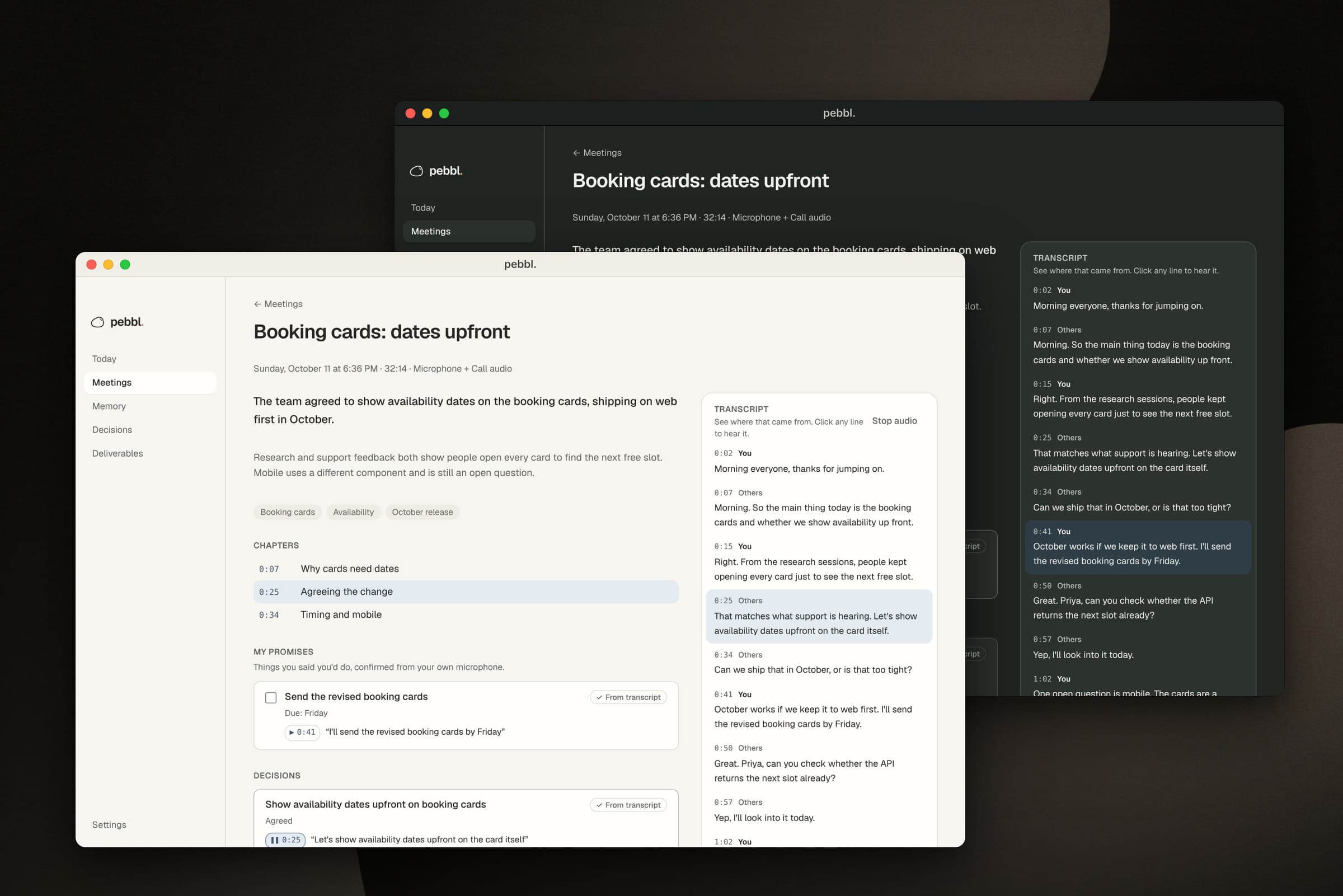
What: every decision, action and chapter carries a citation: a transcript line and the words quoted from it. Click it and you hear that moment. Why: a summary you can't check is a rumour. The fastest way to lose someone is one confident, wrong action item.
Evidence Mode · every claim needs a receipt
A model will happily cite a line that doesn't say what it claims. So pebbl. checks every citation before you see it.
Notes
Transcript
- 0:07OthersMorning. So the main thing today is the booking cards and whether we show availability up front.
- 0:15YouRight. From the research sessions, people kept opening every card just to see the next free slot.
- 0:25OthersThat matches what support is hearing. Let's show availability dates upfront on the card itself.
- 0:34OthersCan we ship that in October, or is that too tight?
- 0:41YouOctober works if we keep it to web first. I'll send the revised booking cards by Friday.
- 0:50OthersGreat. Can you check whether the API returns the next slot already?
- 0:57OthersYep, I'll look into it today.
The important call was where the check lives. Asking a model to be honest is a hope; checking its answer is a guarantee. So the model returns citations, and native code decides. A quote found word for word is verified. A real line with different words is shown as AI interpretation. A citation to a line that doesn't exist is dropped, and the count is shown rather than hidden.
2. My promises
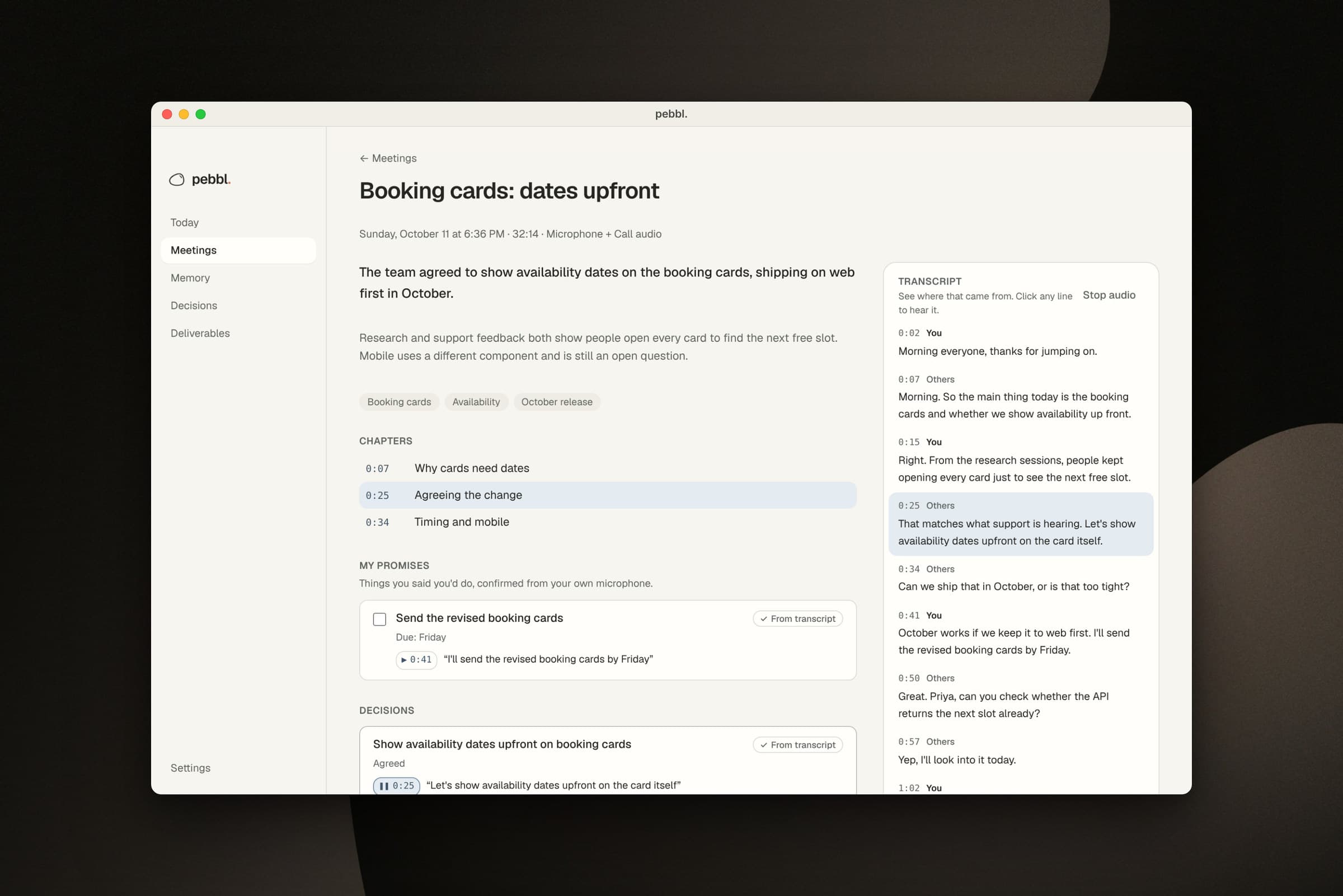
What: a list of the things you said you'd do, across every meeting, with due dates. Why: that's the list people actually need on a Friday afternoon, and models are generous with ownership. So the rule is strict and written in code: the model says you own it, the quote is verified, and the line came from your own microphone track.
My promises · decided by code, not the model
The list people actually need after a meeting is what they said they'd do. A wrong entry there costs trust fast.
“I'll send the revised booking cards by Friday.”0:41 · your microphone
- ✓ The model says the owner is me owner = me
- ✓ The quote is word for word in a real line verified
- ✓ That line is on my microphone track, not echo speaker = you
3. Honest capture
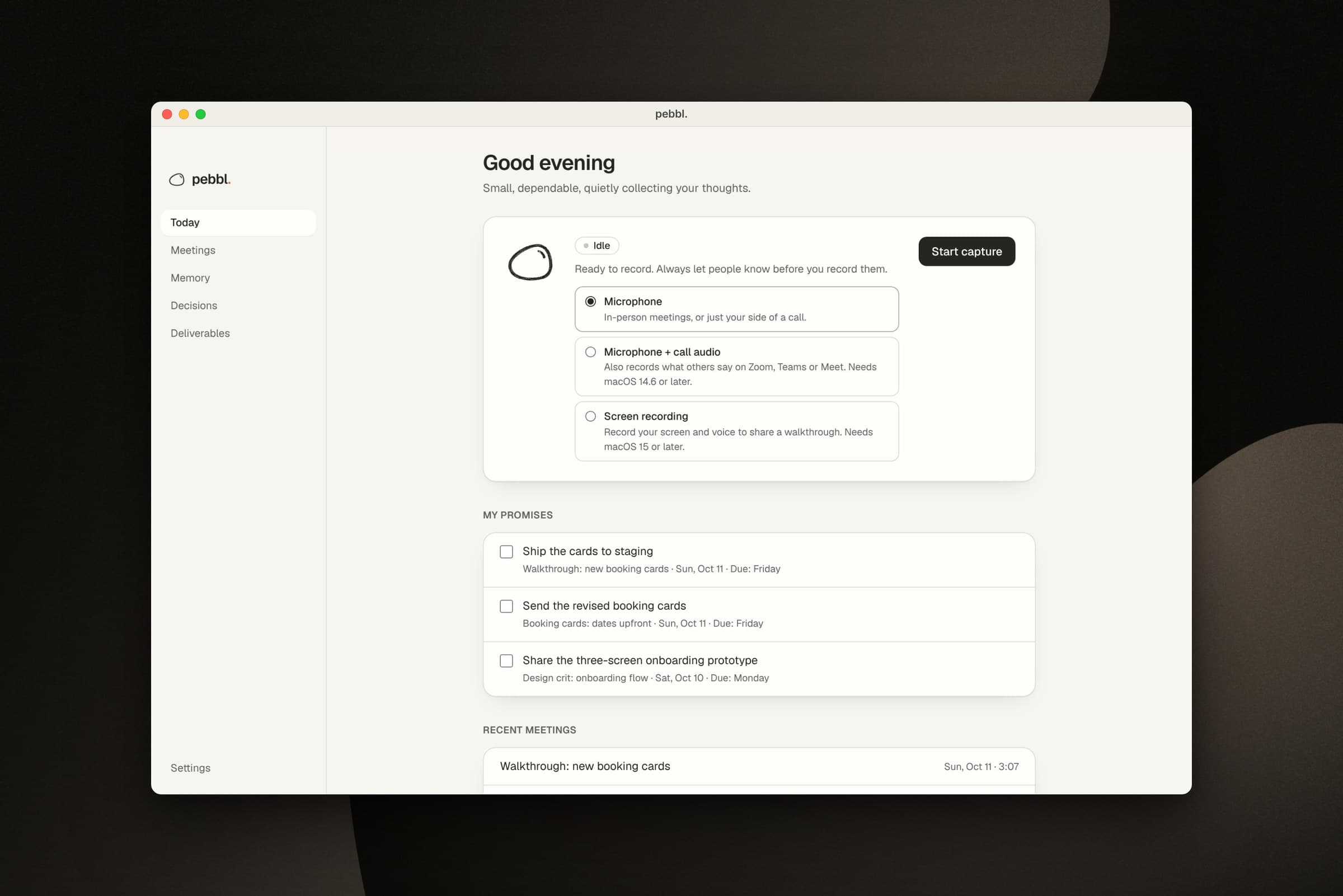
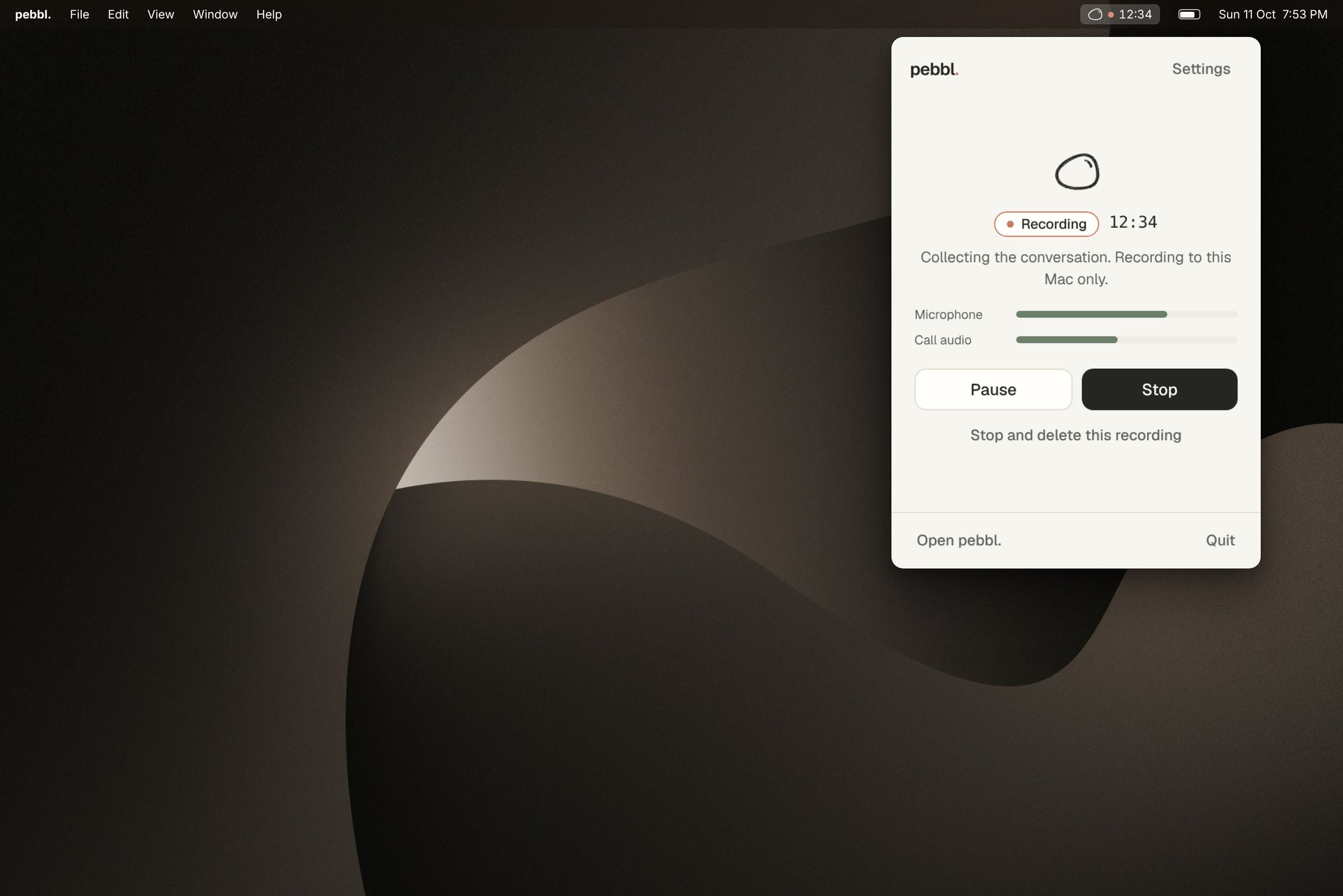
What: the recording lifecycle lives in the native layer, and the interface only shows what it reports. Why: the worst failure a notetaker has is silent. It only says Recording once the first real audio arrives. Pure silence becomes “No sound coming in” after 1.5 seconds. Audio is written in 30-second chunks with the header rewritten every second, so a crash costs about a second.
Capture · say Recording only when it's true
The worst thing a notetaker can do is look like it's recording when it isn't. You only find out after the meeting.
- Idle
- Preparing
- Recording
- Stopping
- Finalizing
- Problem
- Start capture pressed.
4. Private by default
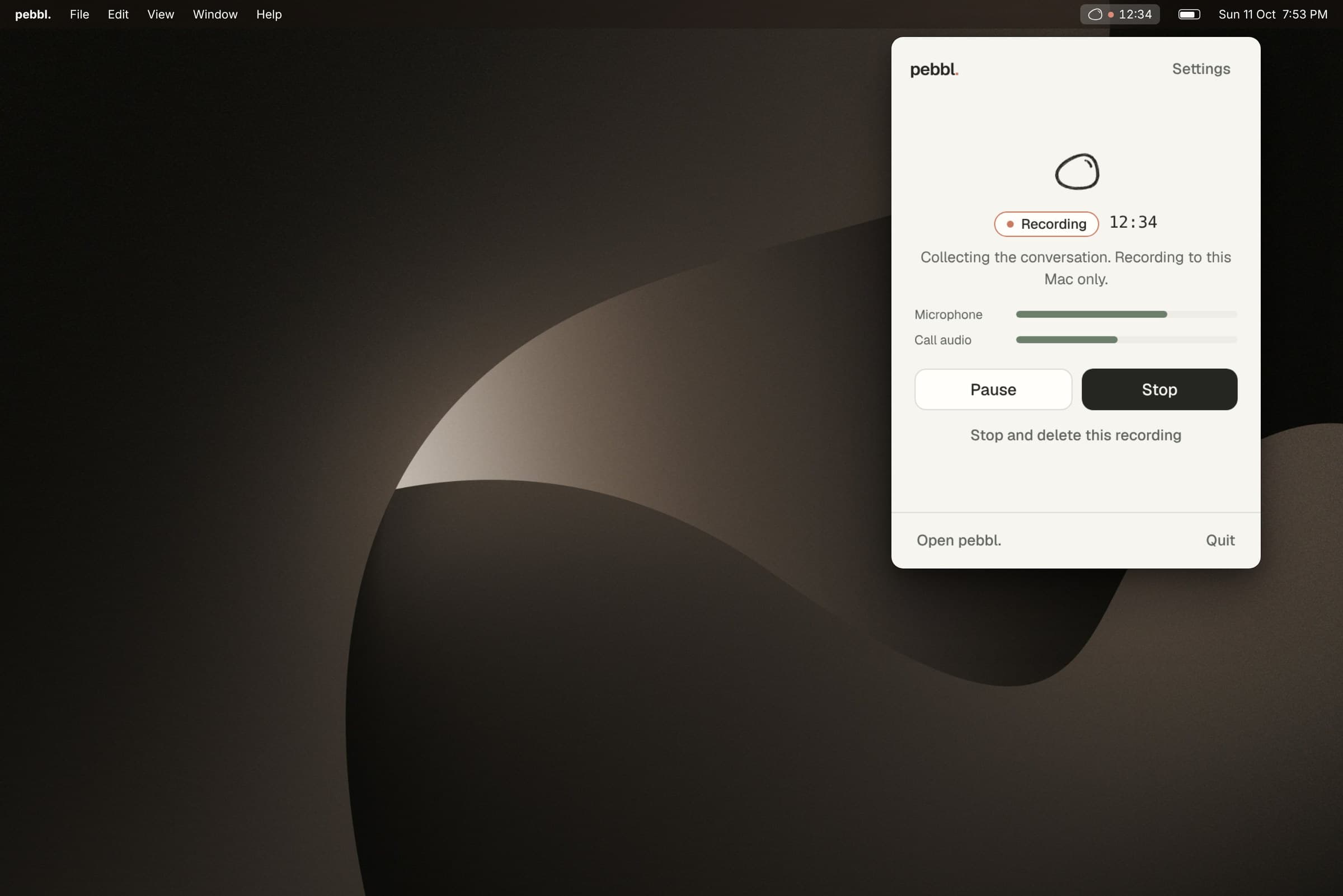
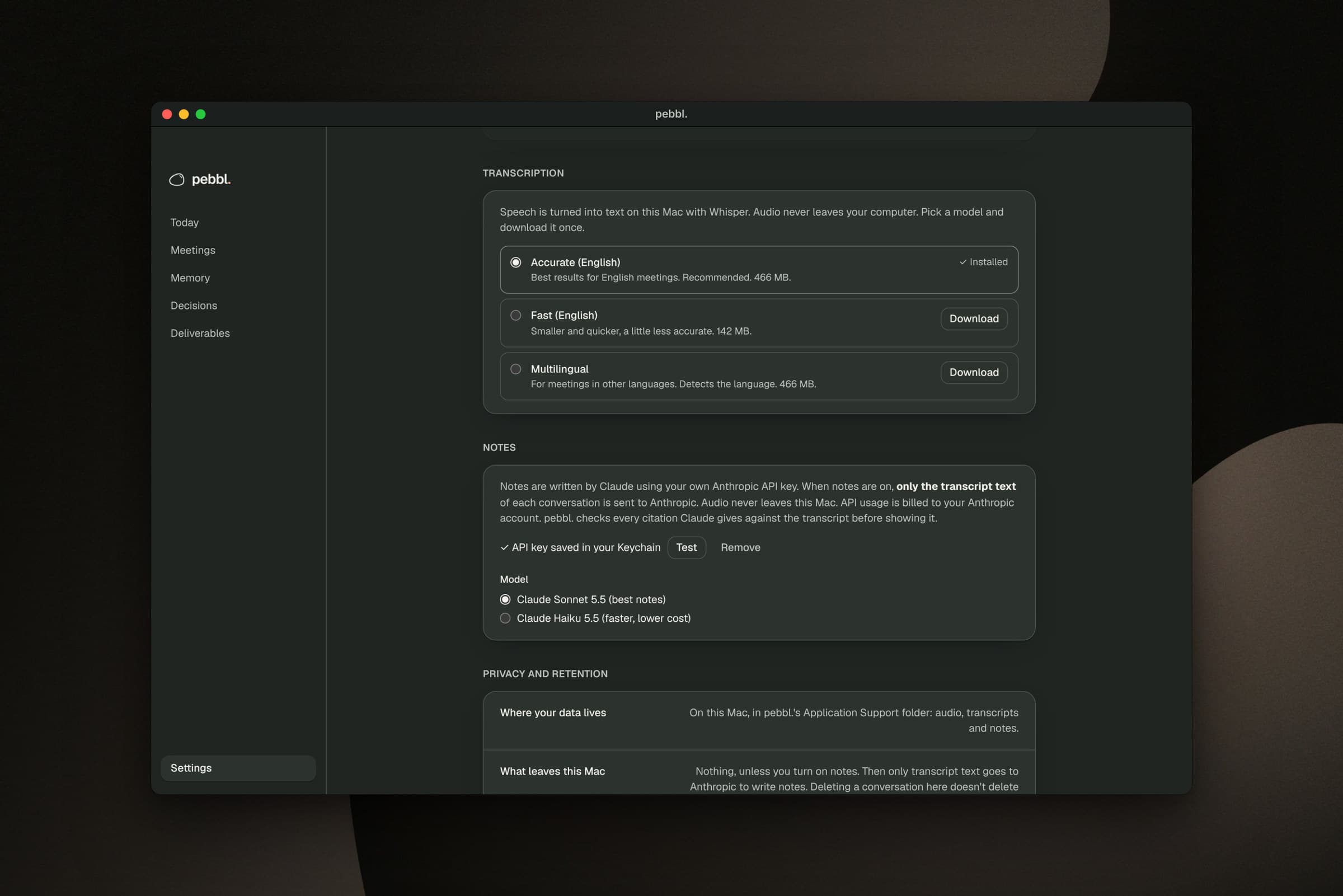
What: speech becomes text on the Mac with Whisper. Notes are optional, use your own Anthropic key from the Keychain, and send transcript text only. Why: people are recording their colleagues, so the default has to be that nothing goes anywhere. Separate tracks also mean “you” and “others” come from the track, not from guessing voices.
Privacy · what leaves this Mac
People are recording their colleagues. The default has to be that nothing goes anywhere.
Leaves this Mac: nothing. Audio: never.
5. Decisions that keep their history
What: a trail of decisions across meetings, with links like Replaces it, Builds on it and Conflicts with it. Why: plans change, and a tool that quietly overwrites the old answer makes every argument about who said what. pebbl. never rewrites history. It suggests a connection from shared wording, changes nothing until you choose, and keeps an append-only record.
Decisions · never silently rewrite history
Decisions drift across meetings. Notes tools overwrite the old answer. pebbl. keeps both, and asks you how they relate.
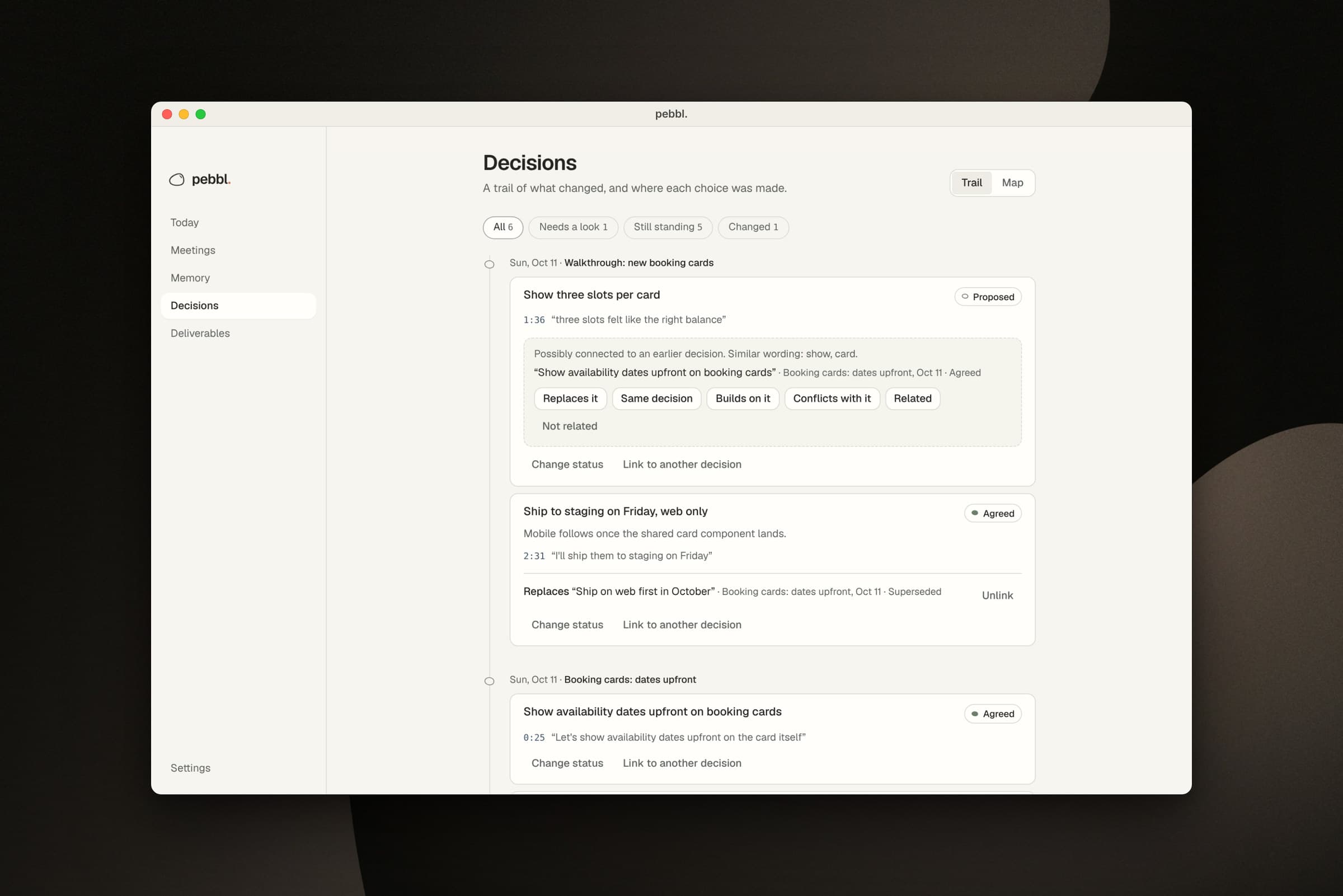
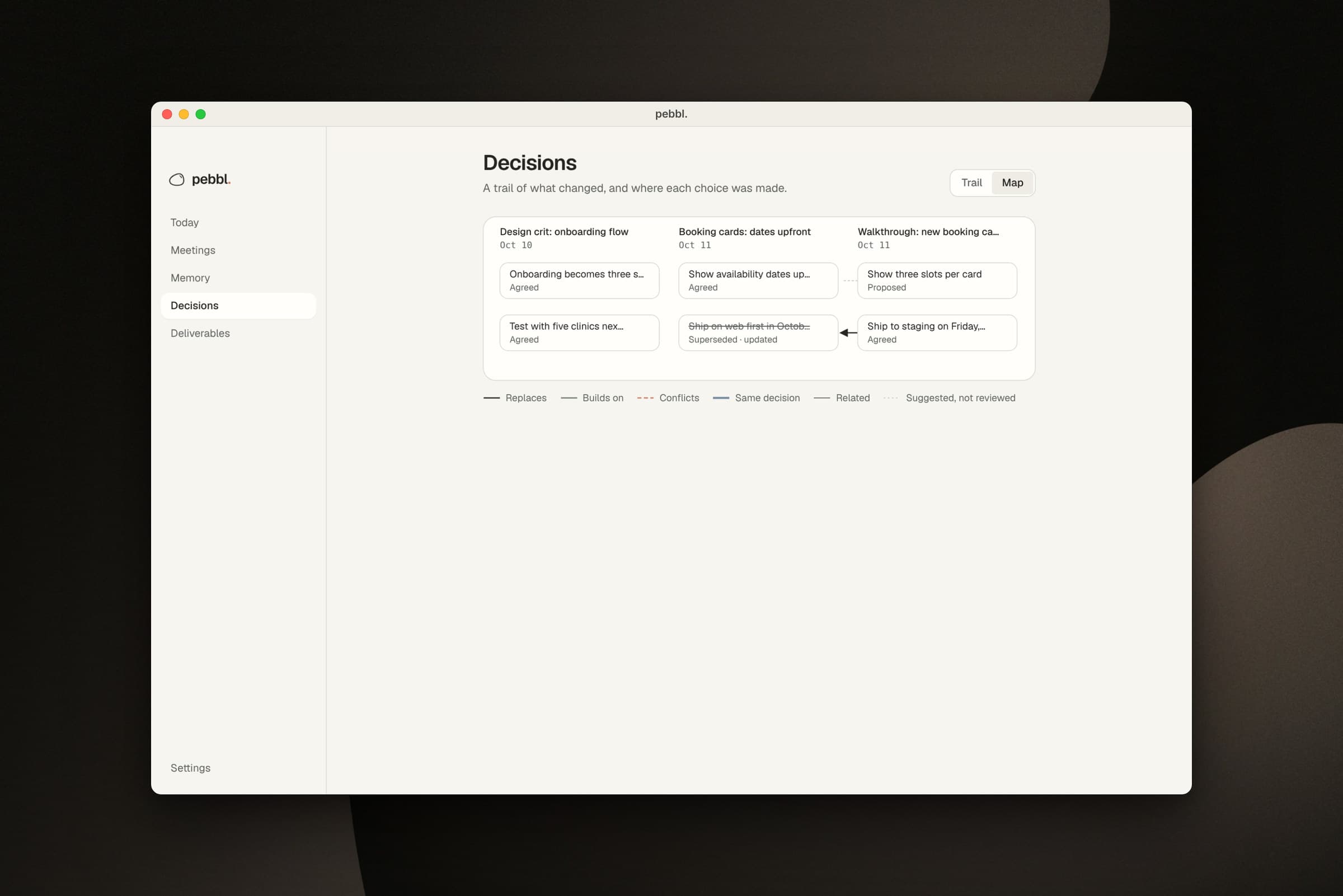
The Trail shipped first and the Map second, on purpose. A graph drawn before the data model works is decoration. Once links and history held up in tests, the Map became a second way into the same facts, with a screen-reader list stating every connection in words.
Wireframes
I wireframed nine screens on the same grid as the final build, so each numbered note sits on the same element in both. Switch between Wireframe and Built to see what changed, and what didn't.
Wireframes · nine screens, one grid
Drawn low-fi first, then built on the same grid. Every number sits on the same element in both views.
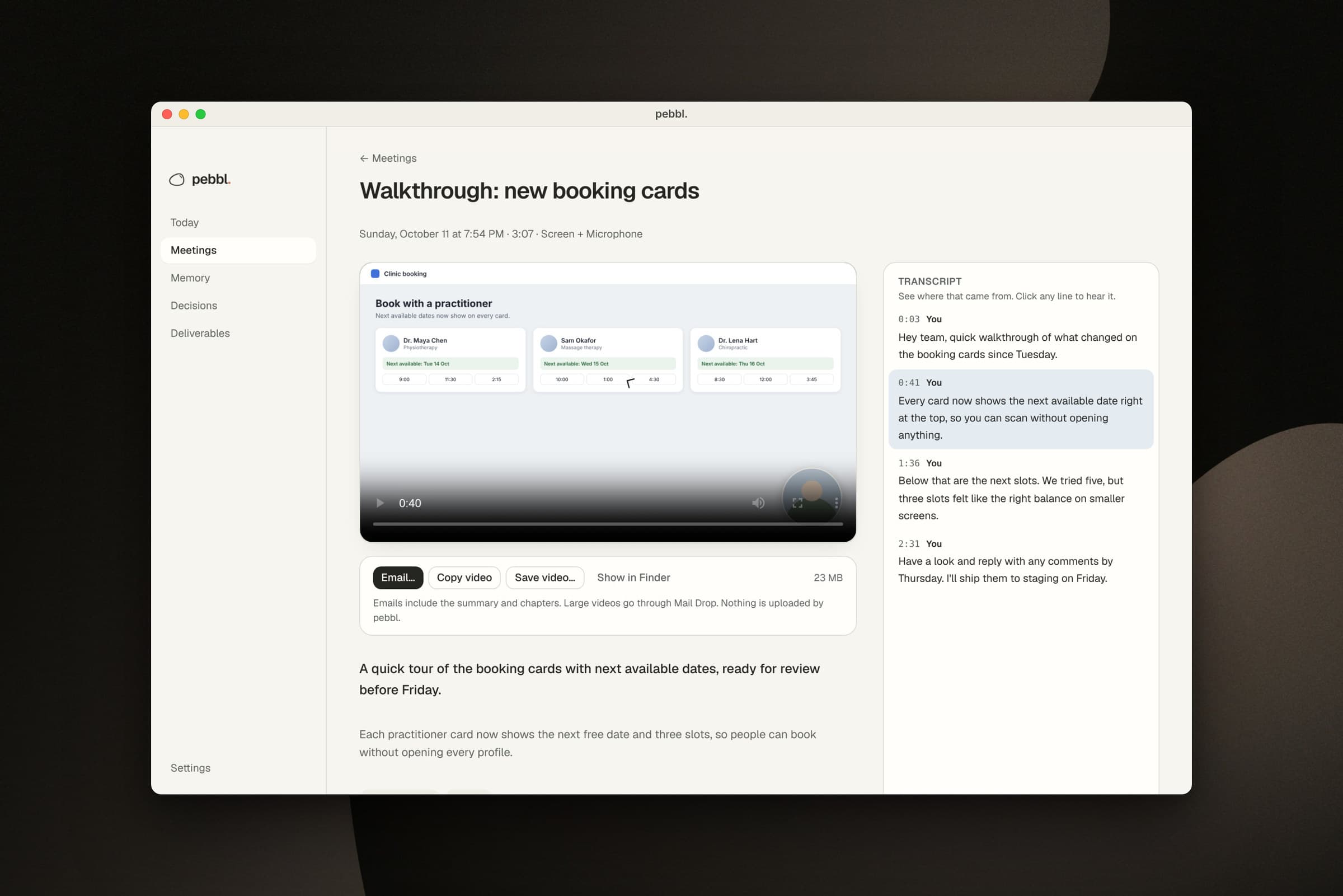
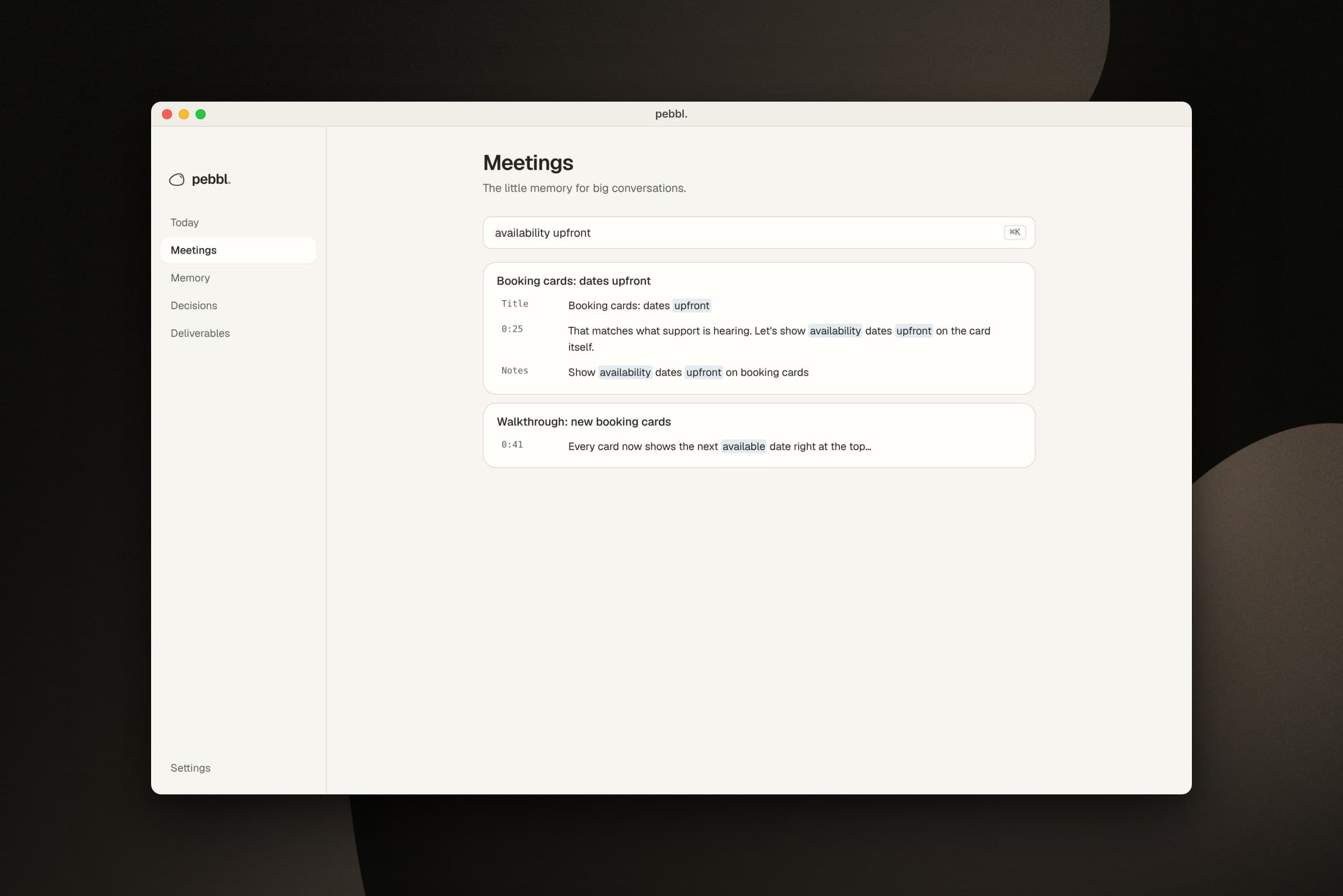
The design system
- Mineral warmth. Chalk and paper surfaces, ink text. Moss means live and healthy, clay means recording, slate-blue means evidence.
- Never colour alone. Every status pairs a colour with a word and a shape. Problems use a square marker.
- Contrast is tested. The muted grey was darkened until it passed WCAG AA on every surface, and a test checks the pairs in both themes.
- Motion has a job. Still when idle, breathing while listening, a slow drift while processing, and static for errors. Reduce Motion is respected.
- Licensed type. Geist, bundled locally under the OFL. Timestamps in the system mono.
How it was built
I wrote the spec first, and that's where most of the design happened: positioning, jobs to be done, what V1 must do, what it must not pretend to do, and phases with exit gates. Then I built it with Claude in one sitting, logging each decision as it was made.
- Phase 0Foundation
Tauri shell, menu bar, popover, design tokens with contrast tests.
- Phase 1Capture
Microphone and call audio to crash-safe files, with recovery.
- Phase 2Evidence
On-device transcription, checked notes, Evidence Mode, My promises.
- Phase 3Library
Search, editing, export, retention, shortcuts.
- ThenScreen and brand
Screen recording, the brand system, chapters, the decisions trail.
- Phase 5Decision graph
Links, append-only history, suggestions and the Map.
The non-goals mattered as much as the features. V1 refuses to pretend it can capture every meeting automatically, tell every voice apart, be perfectly accurate, or get consent on your behalf. Saying no is what kept a one-day build honest.
Validation
An app about not overclaiming shouldn't overclaim about itself. The status file uses one rule: “tested” means verified by a named command in a named environment. Here's where each piece stands.
Validation · the project shows its receipts too
An app about not overclaiming shouldn't overclaim about itself. Every feature says how far it has been checked.
17/17Automated tests
13/17Run on a Mac
1/17
What I learned
- The spec was the design work. Writing down the non-goals and exit gates did more for the product than any screen.
- Trust is mostly what you refuse to show. A dropped citation, a hidden echo line and a missing promises list are all features.
- Building in the real material surfaces real decisions. “Recording only after the first buffer” and echo removal never come up in a mockup.